
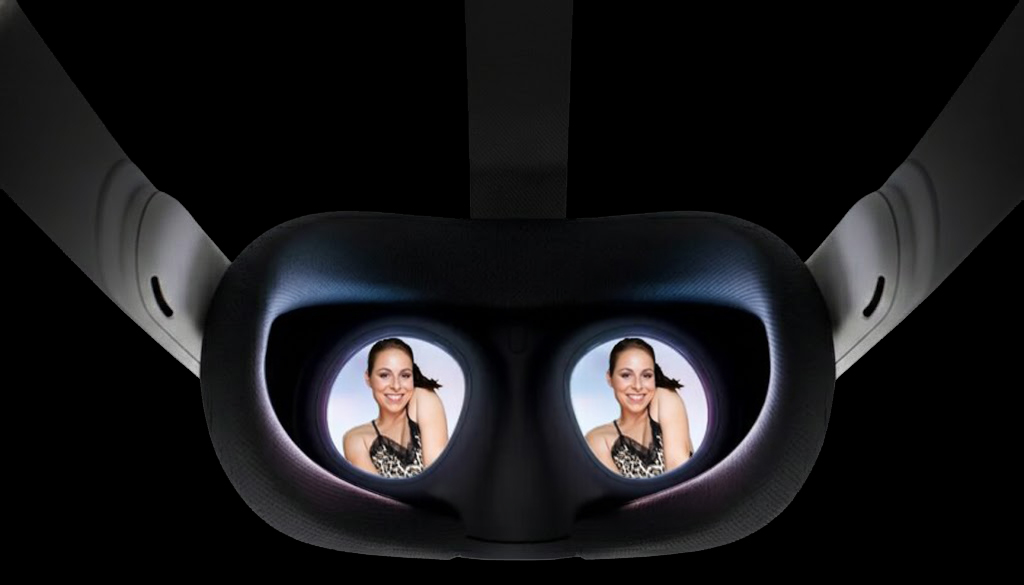
Passthrough AR porn is still a new format, and the setup can feel confusing the first time you try it. We built ARFreaks specifically to make this process as simple as possible, so this guide walks through the exact methods that currently work best—especially on Quest 3.
If something doesn’t work immediately, don’t worry, WebXR and passthrough features are still evolving across headsets, and most issues are easy to fix in under a minute.
What Is Passthrough AR Porn?
Passthrough AR porn blends virtual video content with your real-world environment using your headset’s cameras. Instead of being fully immersed in VR, the porn star appears inside your actual room, creating a more natural and interactive experience.
This works by combining stereoscopic video formats with chroma or alpha transparency, allowing the video subject to appear layered into your physical space.
Modern headsets like Quest 3 make this possible through real-time passthrough and WebXR browser support.
Method 1 – Stream
If you have a WebXR-enabled headset such as the Meta Quest 3 or Samsung Galaxy XR, select a video and click ENTER AR. Your headset will automatically launch the immersive passthrough experience directly in the browser.

This method works directly in your headset’s browser, no app required. For a deeper dive into how WebXR powers our custom player, check out how WebXR powers ARFreaks.
Reality note: The first time launching WebXR, your headset may request permissions or briefly pause while loading. This is normal.
Controls
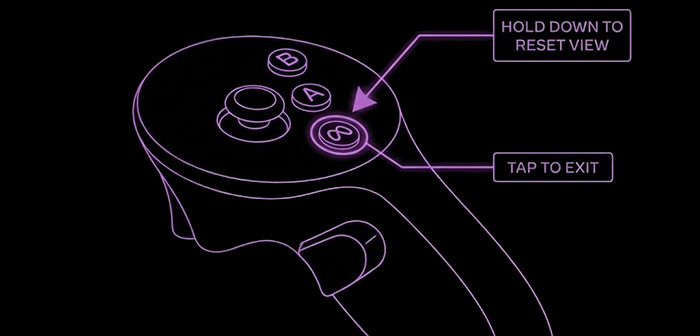
This feature is currently in beta and actively being improved. Feedback helps a lot—if something feels off or doesn’t work on your setup, let us know.
Method 2 – Download
If you want the best video quality and the most control over passthrough blending, downloading the video is usually the most reliable option.
Install one of these passthrough-compatible VR players on your Meta Quest 3:





Then choose a video and tap Download Video and save it directly to your headset.

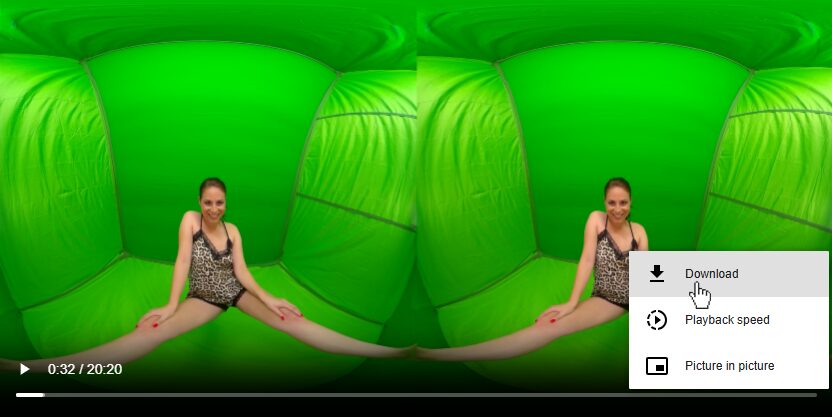
Once downloaded, open the file in your player app and enable passthrough mode. Adjust chroma or alpha settings depending on your lighting for the best blend.
Tip: Downloading is usually smoother than streaming if your Wi-Fi isn’t perfect.
What Actually Works Best (From Testing)
After testing dozens of passthrough setups across different players and environments, a few patterns are consistent:
- Streaming is fastest for quick viewing
- Downloads provide the cleanest passthrough blending
- Room lighting affects quality more than resolution
- Most users switch between both methods depending on the situation
Common First-Time Mistakes
- Opening videos in a non-WebXR compatible browser
- Trying passthrough in a dark room
- Not enabling passthrough or boundary in headset settings first
- Expecting perfect blending without adjusting player settings
Why ARFreaks is Your Best Choice for Passthrough AR Porn
The ARFreaks player is custom-built for passthrough video using WebXR, designed to reduce setup friction and make AR playback as close to one-click as possible.
Our passthrough AR porn player represents over a decade of technological advancement. From early web cam experiments to today’s WebXR players, the journey has been remarkable. Read the history of AR Porn for the complete story.
Most other sites rely on external apps or basic embeds that are not optimized for passthrough blending.
Detailed Setup Instructions
For Method 1 (Streaming):
If the ENTER AR button is not working, passthrough or boundary may need to be enabled:
Enable Passthrough
- Put on your Quest 3 headset
- Press the Meta button on your right Touch controller.
- On the left side of the universal menu, toggle Passthrough.
- Complete the boundary setup if prompted
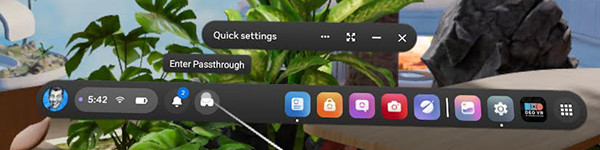
On older firmware this may appear under Experimental Features.
Enable Boundary
- Put on your Quest 3 headset
- Press the Meta button on your right Touch controller.
- Select the clock on the left side of the universal menu to open Quick settings.
- Select Settings in the top right, then select Environment setup.
- Select Boundary. From here, you can clear your previous boundary or create a new one.
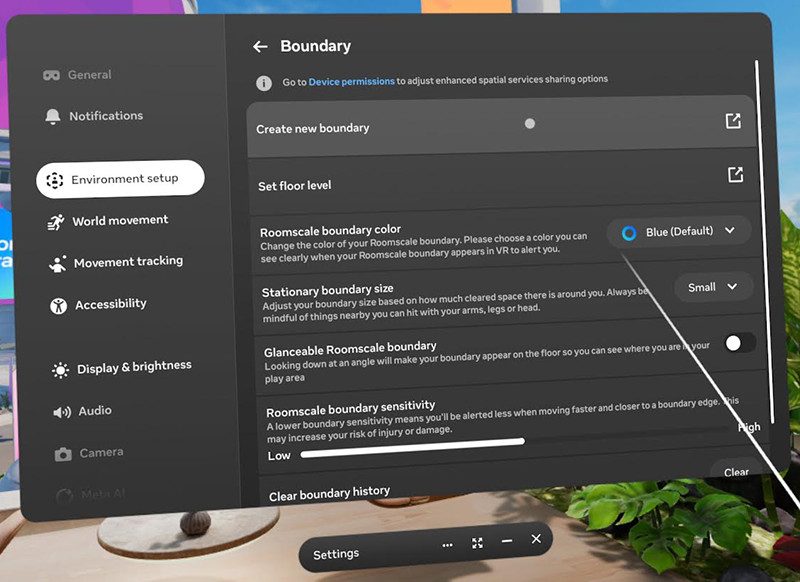
For Method 2 (Downloading): Optimize Your Experience
- Download higher resolutions when available (4K–8K)
- Adjust chroma/alpha based on the video and your room lighting
- Use stable Wi-Fi for faster downloads
- Make sure you have enough storage space available
Troubleshooting & Advanced Tips
If something isn’t working, it’s usually one of these.
❌ ENTER AR button isn’t working
- Confirm passthrough and boundary is enabled
- Use the Meta Browser (WebXR support varies)
- Check your internet connection
- Try downloading instead
❌ Video buffering or low quality
- Aim for at least 25 Mbps
- Close background apps
- Downloading will eliminate buffering
- Try a different video with a lower resolution
❌ Passthrough blending looks off
- Increase room lighting
- Adjust chroma/alpha settings
- Redo boundary setup
❌ WebXR feels laggy
- Restart the headset
- Update firmware
- Try a different video with a lower resolution
Performance Expectations
Passthrough quality can vary depending on room lighting, headset temperature, and firmware version. If performance drops or the image looks less stable, restarting the headset usually fixes it.
Quality is also affected by how the video was filmed. Content shot specifically for AR such as ARPorn.com and SexLikeReal usually performs better. Videos with backgrounds removed in post can sometimes have a glow around them and look softer, while properly filmed alpha passthrough content typically produces the cleanest and most natural blending. Click here to learn more about the four core production methods.
Headset updates and improved filming techniques continue to improve passthrough results over time.
🤔 Frequently Asked Questions
What headsets work best?
- Best experience: Quest 3
- Also works: WebXR-compatible headsets (such as Samsung Galaxy XR)
- Limited support: Apple Vision Pro (WebXR passthrough still evolving)
Do I need to pay anything?
No. ARFreaks offers free streaming and free downloads of available videos.
Is this legal?
All users must be of legal age in their jurisdiction to view adult content. All videos featured on our site are legally produced, and all performers are verified to be 18 years of age or older at the time of filming. The content is used for promotional purposes and links to official sources or partner sites where applicable. We respect industry compliance standards, including record-keeping requirements under 18 U.S.C. §2257, which are maintained by the original content producers.
How does the player work?
The player uses WebXR and Three.js to communicate directly with your headset and render passthrough video without requiring a separate app. It can detect and process different passthrough formats depending on how the video was produced. This includes chroma key passthrough, where solid-color backgrounds are removed so performers appear in your real-world environment, and alpha channel passthrough, where embedded transparency data creates cleaner edges and more realistic blending. Click here to learn more.
Try Passthrough in 30 Seconds
Click any video and press ENTER AR. No setup required.
Last Updated: February 2026 | Written by Scott Camball, creator of ARFreaks and WebXR developer.